NMR will need you to complete the following steps for each physical location you have. There are two things we need from your Clover account in order to start pulling product data:
1.) Find and Send Your Merchant ID for each location
Here’s how you can find your alphanumeric MID (Merchant ID) in your Clover POS account — it depends a bit on whether you’re accessing through the Clover Dashboard (web) or the device itself:
From the Clover Web Dashboard
Go to Clover Dashboard and log in with your Clover credentials.
In the top right, click “Settings” gear icon > View All Settings
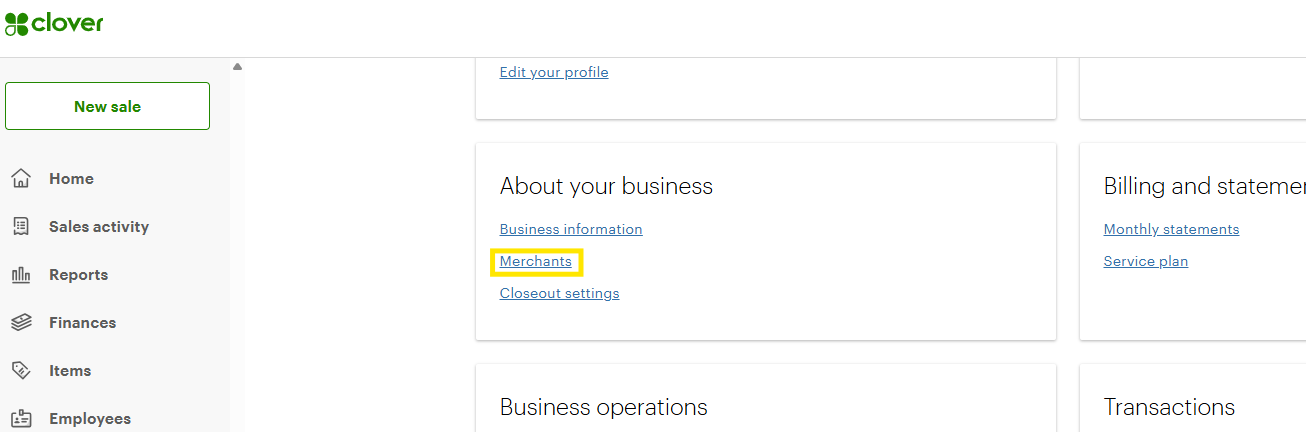
Under “About Your Business”, click "Merchants", look for the alpha-numeric MID, this is typically directly below your business name
It may appear as something like:
M123ABC4567890
You can also find it in:
Billing statements (email or PDF from Clover or your processor)
Settings → Merchant Information section
From Your Clover POS Device
Tap the “Setup” app on your Clover home screen.
Tap “Business Information” or “About.”
Look for the Merchant ID (MID) — it’s usually listed along with your business name, contact info, and device ID (TID).
2.) Generate and send a Clover API Key for each location
Was this article helpful?
That’s Great!
Thank you for your feedback
Sorry! We couldn't be helpful
Thank you for your feedback
Feedback sent
We appreciate your effort and will try to fix the article